


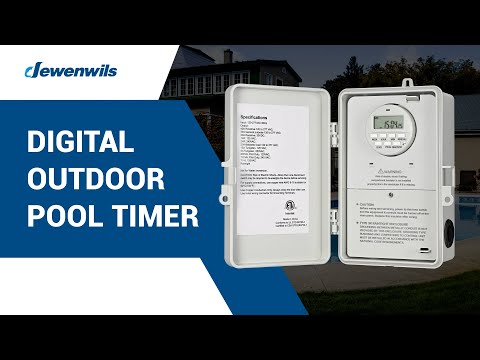


Digital Pool Pump Timer - SHODT01B
DEWENWILS Outdoor Pool Pump Digital Timer Box, 7-Day 20 ON/Off Programmable Timer Switch-SHODT01B
-
Estimated delivery: Oct 24 - Oct 28
Couldn't load pickup availability
Specifications
Specifications
- Electrical Ratings:
Input Voltage, Frequency: 120-277VAC, 60HZ
Max Current: 40 A
- Motor Rating: 2 HP
- Control Way: Digital Dial Timer
- Operation Mode:
- Certification: ETL
- Product Dimensions (L x W x H): 9.25 * 6.69 * 4.84 in
- Net Weight: 1.68 lbs
Free Shipping
30-Days Free
Secure Payment
Fast Delivery
Your payment information is processed securely. We do not store credit card details nor have access to your credit card information.


Sturdy Plastic Case
Protected by a high-quality plastic case, the pool timer is sturdy for long-lasting use, avoiding being damaged or corroded by water and extreme weather.

Well Sealed
The pool timer is designed for both outdoor and indoor use. Equipped with waterproof pads, there is no worry about water seeping into or damaging the wires.
【Multiple Setting & 5 Modes】Up to 20 ON/OFF schedules for 7-day repeat cycles or a single-day setting to meet your needs; pool controller has options for Always ON/ OFF, AUTO ON/OFF, and Daylight Saving Time (DST) modes; turn it ON/OFF or change modes using the MODE button; multiple modes & day settings to save on your electric bill
【Heavy Duty 40 AMP & Versatile】With 40 Amp 2HP 120/240/277 VAC, the pool pump timer control up to 2 units at once; designed for outdoor/indoor high-power appliances like pool pumps, heaters, filters, and other motor-driven equipment; giving peace of mind and convenience for managing your pool and outdoor equipment
【Built-in Battery Keeps Settings】Backup battery included with 3 months available; No need to repeat settings for 7-day pool timer switch in case of power failure; hassle-free use; No more worry about losing your previous timing and settings
【Weather-resistant & Durable】Waterproof resin PC housing with flame-retardant insulation resists UV & high temperatures; 2 water outlet holes prevent water from entering the junction box; pool pump timer outdoor operate from -40℉ to 140℉ for long-lasting performance; No need to turn it off or store it in bad weather
【Easy Installation】Removable timer module makes simple wiring and hassle-free; heavy-duty pool timer wiring apertures in 2 sizes (1/2'' and 3/4'') to suit your needs; included wiring caps to simplify the installation process and ensure a smooth setup
Shipping
Free shipping on all orders. Products are shipped from U.S. local warehouses for faster and more reliable delivery.
Learn more in our Shipping Policy.
Returns
If you’re not satisfied with your purchase, returns are accepted according to our return guidelines.
Please review our Return Policy for details.

UGC PROGRAM | UP TO 50% CASH BACK 💴
50% product cashback for Video Creators
Extra 20% OFF store coupon
Up to 500 Bonus member points
Partner with us and start earning by promoting our products. Sign up today!
Compare with Our Best Sellers
Safe, Smart and Perfect for Pool Pump Timing

App Control(Wifi) Pool Pump Timer - SHOWT01ARegular price
$6999
Sale price
$6999
Regular price
-5%
|

App Control(Wifi) Pool Pump Timer - SHOWT01CRegular price
$4999
Sale price
$4999
Regular price
-10%
|

App Control(Wifi) Pool Pump Timer - SHOWT01DRegular price
$5999
Sale price
$5999
Regular price
|

Mechanical Pool Pump Timer - SHOMT01BRegular price
$4999
Sale price
$4999
Regular price
|
|
|
Input Voltage: 120-277VAC |
Input Voltage: 120-277VAC |
Input Voltage: 120-277VAC |
Input Voltage: 120-277VAC |
|
|
2 HP |
2 HP |
2 HP |
2 HP |
|
|
App Control(Wifi / 2.4GHz, Support Alexa and Google Home ) |
App Control(Wifi / 2.4GHz, Support Alexa and Google Home ) |
App Control(Wifi / 2.4GHz, Support Alexa and Google Home ) |
Mechanical Dial Timer |
|
|
|
|
|
|
|
|
cULus |
ETL, FCC |
ETL, FCC |
ETL |
|
|
10.75 * 7.76 * 4.25 in |
9.25 * 6.69 * 4.84 in |
9.45 * 6.69 * 4.45 in |
9.45 * 6.69 * 4.45 in |
|
|
2.67 lbs |
1.68 lbs |
1.68 lbs |
1.68 lbs |
Frequently asked questions
What if there’s an issue with my order or product?
What if there’s an issue with my order or product?
If you experience any issues, simply contact our support team.
Support Email: service@dewenwils.com
We’ll work with you to find a quick and fair solution.
Questions about Shipping:
Questions about Shipping:
Q: How long does shipping take?
A: Orders are typically processed within 1-2 business days.
Delivery times vary by location, but most orders arrive wvithin 3-7 business days.
Q: How much does shipping cost?
A: We offer free shipping on all orders.
No minimum purchase required.
Questions about After-Sale:
Questions about After-Sale:
Q: How can I contact customer support?
A: You can reach us anytime via the contact form on this paage
Our support team typically responds within 24 hours on bpusiness days
Support Email: service@dewenwils.com
Q: What if there's an issue with my order or product?
A: If you experience any issues, simply contact our support teaam
We'll work with you to find a quick and fair solution.
Q: Are your products covered by a warranty or guarantee?
A: Yes. All our products are backed by a 365-day warranty.
If you experience any quality-related issues within this period,our support team will be happy to help you with a solution.
Questions about Pool Pump Timer
Questions about Pool Pump Timer
1. How Does a Pool Pump Timer Work?
A pool pump timer controls the electrical power to the pump. Once installed, it is connected between the power source and the pump. Users set the desired times, and the timer automatically switches the pump on and off according to the programmed schedule, keeping pool water filtered and circulated even when the owner is away, while saving energy.
2. How to Calculate Pool Pump Run Time?
To calculate the ideal run time for your pool pump, you need two key values: pool volume and pump flow rate.
Step 1: Determine Pool Volume – Use the formula based on your pool shape:
Rectangular: Length × Width × Average Depth × 7.5 = Gallons
Round: π × Radius² × Average Depth × 7.5 = Gallons
Oval: Length × Width × Average Depth × 6.7 = Gallons
Kidney-Shaped: (A + B) × Length × 0.45 × Average Depth × 7.5 = Gallons
Irregular: Longest Length × Widest Width × Average Depth × 5.9 = Gallons
Tip: Average Depth = (Shallow End + Deep End) ÷ 2
Step 2: Check Pump Flow Rate – Measured in GPM (gallons per minute) or GPH (gallons per hour).
Convert GPM → GPH: GPM × 60
Convert GPH → GPM: GPH ÷ 60
Step 3: Calculate Run Time – Pump Run Time (hours/day) = Pool Volume ÷ Pump Flow Rate (GPH)
Example:
Pool volume: 20,000 gallons
Pump flow rate: 40 GPM → 2,400 GPH
Run Time: 20,000 ÷ 2,400 ≈ 8.3 hours/day
Running your pool pump according to this calculation ensures proper water circulation, filtration, and energy-efficient operation.
3. How to Install a Timer on a Pool Pump?
Installing a DEWENWILS pool pump timer is simple and user-friendly. First, turn off the power to your pool pump.
Check Voltage and Pump HP – Ensure the timer voltage (120V, 240V, or 277V AC) matches your pump. For pumps of different horsepower (1–2 HP), make sure the timer’s rated load can support the pump. High-HP pumps may require separate circuits or heavy-duty timers.
Wiring the Timer – Connect the power lines (live, neutral, and ground) to the timer input terminals. Then connect the timer output to the pump according to the pump’s voltage and horsepower. For multiple devices, connect each load according to its rated capacity and voltage, ensuring no overload. (Wiring instructions are included in the manual.)
Test the Timer – After wiring, restore power and run a test. Confirm that the pump turns on and off according to the programmed schedule.
4. How to Set a Pool Pump Timer?
Setting a DEWENWILS pool pump timer depends on the type: Mechanical, Digital, or Smart Wi-Fi.
- Mechanical Timer
①Turn the dial clockwise until the arrow points to the current time. Start with all pins in the inner ring (OFF).
②Push out the pins for the times you want the pump to run.
Note: Set the manual switch to “I” for always ON, or to “O” for always OFF.
- Digital Timer
①Press and hold the “CLOCK” button. Use “HOUR” and “MIN” to set the hours and minutes, and “WEEK” to select the day. Release “CLOCK” to finish setting the current time.
②Press “PROG” to enter ON/OFF programming (up to 20 schedules). Set the ON time using “HOUR”/“MIN”, select the day(s) with “WEEK”, then press “PROG” again to set the OFF time and save.
③Repeat to program multiple schedules
Note: Ensure the timer displays “AUTO” for automatic operation.
- Smart Wi-Fi Timer
①Download the Smart Life app.
②Connect the timer to your home Wi-Fi network (2.4 GHz only). Add the device by following the in-app instructions.
③Set schedules in the app by choosing times, days, and modes (Programmable Timer, Random, Countdown, Astronomical).
④Enable voice control with Alexa or Google Assistant if desired.
5. When Is the Best Time to Run a Pool Pump?
The optimal times to run a pool pump are usually during early morning and evening hours when electricity rates may be lower and the water circulation is most effective. Using a DEWENWILS pool pump timer, you can schedule the pump to run automatically at the most efficient times, ensuring clean water while saving energy and reducing costs.
6. Do Pool Pumps Run All the Time?
No. Pool pumps do not need to run all the time. Most pools only require the pump to run for 8–10 hours each day to properly circulate and filter the water. Running the pump continuously wastes energy and increases wear on the equipment.
7. Pool Pump Timer: Differences Between Metal and Plastic Casing?
Plastic (PC) Casing – Waterproof resin PC housing with flame-retardant insulation resists UV and high temperatures. Ideal for long-term outdoor use, it protects the timer from water damage and corrosion.
Metal Casing – Corrosion-resistant metal housing with a resin PC core and flame-retardant insulation. More robust and waterproof than plastic, it is designed for harsher conditions while maintaining reliable performance.
Both metal and plastic DEWENWILS timers operate reliably in extreme temperatures from -40°F to 140°F without needing to be turned off or stored during bad weather.
8. DEWENWILS Pool Pump Digital Timer: Is the Built-In Battery or Replaceable?
The DEWENWILS digital pool pump timer has a built-in battery that is not replaceable. It keeps the timer running for up to 3–6 months during power outages, ensuring that your 7-day schedule is preserved.
9. DEWENWILS Pool Pump Digital Timer: Is the Output a Dry Contact?
Yes. The DEWENWILS pool pump timer uses relay contacts (COM/NO) to switch the load, which functions as a dry contact output. This means the timer itself doesn’t provide voltage — it simply opens or closes the circuit to control your pool pump’s power safely and reliably.
10. DEWENWILS Pool Pump Digital Timer: Can It Control Devices with Different Voltages Simultaneously?
No. A DEWENWILS pool pump digital timer can only operate on one voltage (120V, 240V, or 277V) at a time. Although some models provide two output channels (COM1 & COM2) and can control two devices simultaneously, all connected devices must use the same voltage and will switch on and off together. To control devices with different voltages or separate schedules, multiple timers are required.
11. DEWENWILS Pool Pump Digital Timer: Can It Be Switched to 12-Hour Format?
DEWENWILS digital pool pump timers use a 12-hour format by default.
12. DEWENWILS WiFi/Smart Pool Pump Timer: Can It Operate a Two-Speed Pool Pump?
No. Our timer cannot independently control the high and low speeds of a two-speed pool pump. It can control two devices simultaneously, but both devices must operate together.
13. DEWENWILS WiFi/Smart Pool Pump Timer: Which App Does It Support?
The DEWENWILS WiFi/Smart pool pump timer supports the Smart Life App. You can control the pump remotely from anywhere, not just at home. To ensure reliable operation, make sure you have a stable 2.4 GHz Wi-Fi.
14. DEWENWILS WiFi/Smart Pool Pump Timer: Can It Operate When Offline After the Schedule Is Set?
No. If the Wi-Fi connection is lost, the timer cannot follow the programmed schedule, but you can still manually operate the switch.
15. DEWENWILS WiFi/Smart Pool Pump Timer: Does It Include a Circuit Breaker?
No. The DEWENWILS WiFi/Smart pool pump timer does not include a circuit breaker. Disconnect power at circuit breaker and test if power is off before installing (or servicing) the Timer Box.
16. DEWENWILS WiFi/Smart Pool Pump Timer: What Is the Power Requirement When Connecting Pool Lights?
When connecting pool lights to a DEWENWILS timer, make sure the total load does not exceed the timer’s rated capacity. Typical guidelines:
Incandescent/Tungsten Lights: 120 VAC – 15 A (1800 W), 240 VAC – 5 A (1200 W)
LED Lights: 120 VAC – 5 A (600 W)